The short answer
There is no single best music cataloguing software, because "cataloguing music" (or cataloging a music catalog, in American spelling) describes four different jobs. If you are a songwriter, producer or artist organising your own work, including everything unreleased and unfinished, you need a tool that understands songs, versions and credits, such as Locker. If you are pitching or licensing a catalogue as a publisher, sync agency, manager or composer, you need tagging, search and trackable sharing, which is where DISCO, Composer Catalog, SourceAudio and Locker sit. If you are administering rights, you need registration and royalty tools such as TuneRegistry, Songtrust or Reprtoir. If you are cataloguing a record collection, you need Discogs or CLZ Music. Most frustration with this question comes from being recommended a tool built for a different job.
Last updated 27 September 2026
First, work out which job you are doing
Search for music cataloguing software, or music catalogue management software, and you will get four kinds of product mixed together in one list, with nothing explaining that they solve different problems. It is worth separating them before you look at any tool, because the wrong category will waste weeks.
Almost every bad recommendation in this category comes from skipping this step. A songwriter gets pointed at rights administration software built for publishers. A sync team gets pointed at a record collection app. Both conclude the category is broken, when really they were handed the wrong shelf.
- Creating: you write, produce or record, and you need your own work organised. Demos, bounces, stems, versions, lyrics, who played on what, and getting it to collaborators safely. Your catalogue changes every week and most of it is not released.
- Pitching and licensing: you manage a catalogue in order to get it placed, as a publisher, sync agency, manager, A and R or composer. You need every track tagged and findable, the right version to hand, and to know who listened to what you sent.
- Administering: you hold or represent rights and need to get paid. Works and recordings registered, splits and royalties tracked, and metadata clean enough to survive delivery to distributors and collection societies.
- Collecting: you own physical or purchased music and you want an inventory of it. Pressings, editions, conditions, what you own and what you are missing.
The options, and who each one actually suits
Grouped by the job they are built for rather than ranked, because a ranking across four different jobs would be meaningless. Several tools reach into a neighbouring job, and each entry says so.
For creating: organising your own work
Locker
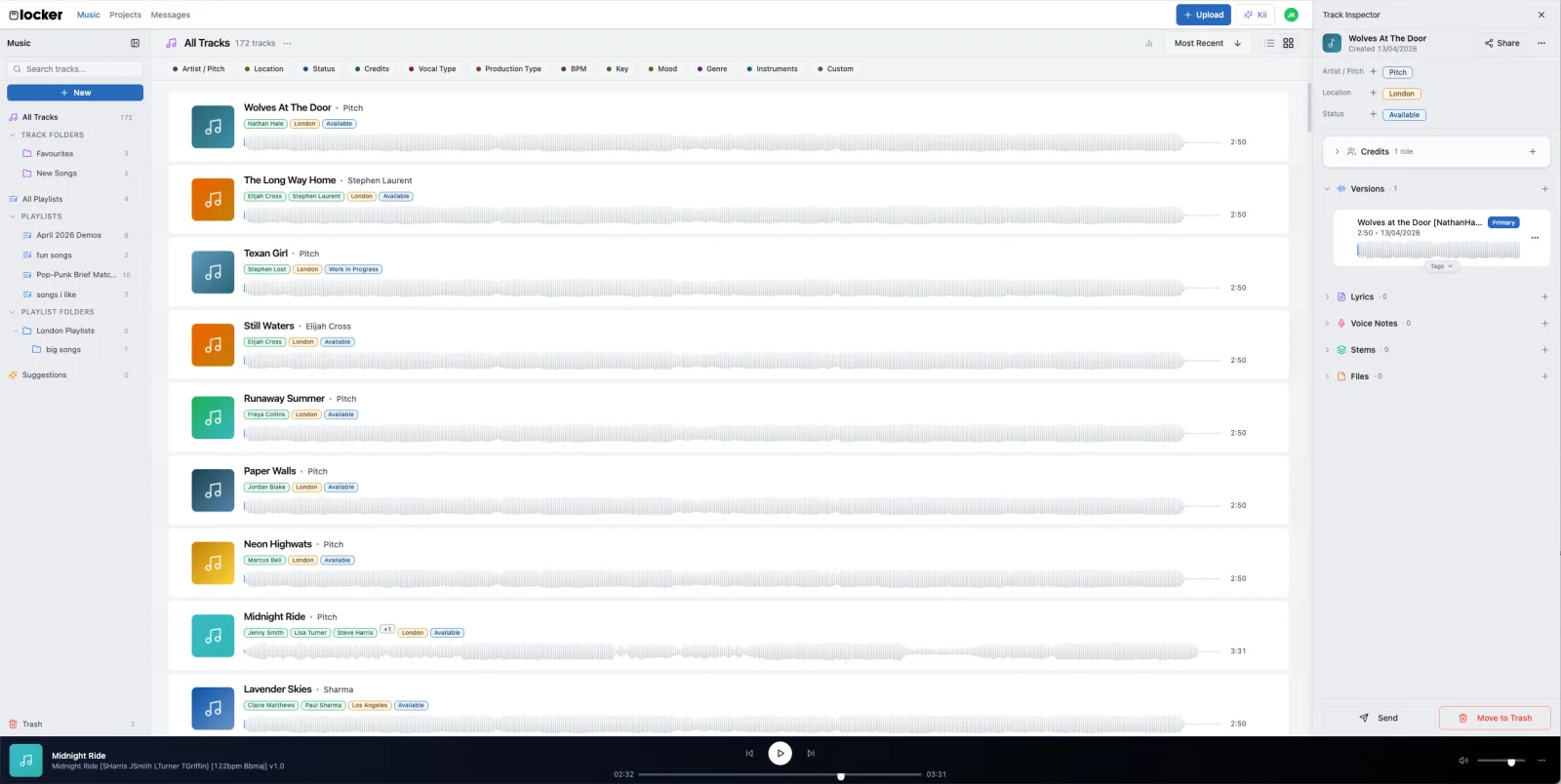
This is usA music catalogue and collaboration platform built for the people making the music, with an AI assistant that works across the whole catalogue.
Bridge.audio
A collaborative workspace for storing and sharing audio, used by creators, labels, publishers and music supervisors.
Dropbox and Google Drive
General cloud file storage. What most people are actually using when they say they have a system.
Airtable and Notion
General databases that people bend into music catalogues.
DAW folders and the Finder
The default. Project folders, a naming convention, and discipline.
For pitching and licensing a catalogue
DISCO
An all-in-one music management platform, and the established standard for sharing and pitching music across sync, labels, publishing and A and R.
Songbox
A private music sharing platform with tight control over who hears what, plus the option to sell directly to fans.
Composer Catalog
Catalogue and pitching software built for TV, film, sync and production music composers.
SourceAudio
A music licensing marketplace and catalogue platform for labels, publishers and production music libraries.
For administering rights and royalties
Reprtoir
Catalogue management built for record labels and music publishers.
TuneRegistry
Self-service publishing administration: songs, recordings and splits in one catalogue, registered with US collection societies from one dashboard.
Songtrust and publishing administrators
Publishing administration and royalty collection.
For collecting: records you own
Discogs and CLZ Music
Collection cataloguing for physical and purchased music.
What a music catalogue should hold for every song
Whichever tool you choose, the catalogue is only as useful as what it knows about each song. These are the details that matter later, when someone asks for the stems, a supervisor asks who owns it, or a royalty statement does not add up. Most of them cost seconds to record while a song is fresh and hours to reconstruct years afterwards.
The split between the song and the recording is the one people most often blur. A composition, the words and melody, has writers, splits and an ISWC once it is registered. A recording of it has performers, producers and an ISRC. One song can have many recordings, and a catalogue that cannot tell the two apart will eventually give someone the wrong answer.
- Every version, with the current one marked: demo, rough mix, master, instrumental, clean edit, and the stems for each.
- Writers and their splits, agreed and written down, plus publishers and collection societies where they exist.
- Who produced, mixed, mastered and played on each recording.
- Identifiers once they exist: ISRC for each recording, ISWC for the composition.
- Tempo, key, genre and mood, so the catalogue can be searched by how it sounds rather than by what it was called.
- Lyrics, and the status of the song: in progress, finished, pitched, on hold, released.
- Where it has been sent, to whom, and what came back.
What actually matters when you are choosing
Once you know which job you are doing, most of the decision is made. These are the things worth checking for creating and pitching specifically, because they are where tools differ most and where the differences only show up after a few months of real use.
- Does it understand versions? A song is not a file. If a tool cannot hold a demo, a rough mix, a final master and an instrumental as one thing, you will end up with four entries and no idea which is current.
- Are credits structured? Contributor names typed into a text field cannot answer "what has this person played on". Real linked records can, and that becomes more valuable every year.
- Can you share without losing control? Sending unreleased music means private links, knowing who opened what, and being able to revoke access.
- Does it record history? A last-modified date tells you something changed. A history tells you what changed, when, and who did it.
- Can you get your catalogue out? Anything holding your life's work should let you export it. Check this before you put five years of material in.
- Does the search understand music? Filtering by tempo, key and mood is a different capability from matching filenames, and it is the difference between finding the right song for a brief and scrolling.
A note on AI in this category
Most tools in this space now advertise AI, and it is worth being precise about what kind, because two very different things share the name.
The useful kind works on everything around the music: detecting tempo and key, transcribing a voice note, suggesting which songs fit a brief, finding a track you can only half remember, tidying metadata. It removes admin and leaves the creative decisions with you.
The other kind generates the music itself. That is a genuine choice to make rather than a feature to assume, and if you care either way it is worth checking a tool's actual position rather than reading the word AI and guessing. Locker, for the record, does not generate music, does not write lyrics, and does not train on your catalogue. That is a deliberate product line, not a limitation waiting to be fixed.
The honest recommendation
If you are making music and your catalogue has outgrown your memory, you want something that understands songs, versions and credits, and Locker is built for exactly that. Bridge.audio is worth a look if shared storage and tagging for a team is the bigger need.
If you are pitching or licensing, DISCO is the established standard and the one your recipients are most likely to have open. Composer Catalog suits sync composers specifically, SourceAudio suits companies licensing at scale, and Locker suits teams whose pitching and creating happen in the same catalogue. Plenty of people end up using two of these.
If you are administering rights, look at Reprtoir for catalogue operations, and at TuneRegistry or a publishing administrator such as Songtrust for registration and collection. These are different layers rather than alternatives to each other.
If you are cataloguing a record collection, Discogs is the default for good reason and CLZ Music is the strongest offline option.
And if your catalogue is genuinely small and your naming convention genuinely holds, folders are a legitimate answer. The moment to move is when you notice you are searching for a song you know you have and not finding it.
Common questions
What is the best software for cataloguing music?
It depends which of four jobs you are doing. For organising your own songs as a songwriter, producer or artist, use a tool built around songs and versions, such as Locker. For pitching and licensing a catalogue, DISCO is the industry standard, with Composer Catalog for sync composers and SourceAudio for licensing at scale. For administering rights, Reprtoir, TuneRegistry and publishing administrators such as Songtrust handle registration and royalties. For cataloguing a physical record collection, Discogs and CLZ Music are the standards.
What is music catalogue management software?
Software that keeps a music catalogue organised and usable: the audio, its versions and stems, the metadata and credits for each song, and a record of where it has been sent. The phrase covers tools for four different jobs, organising your own work as a creator, pitching and licensing a catalogue, administering rights and royalties, and inventorying a record collection, so it is worth knowing which job you are doing before comparing products.
What is the best music catalogue software for publishers and sync teams?
For pitching and licensing, DISCO is the established standard and the platform supervisors are most likely to already use. Composer Catalog is built for sync composers, SourceAudio for companies licensing large catalogues into media, and Locker for teams who want pitching and the creative catalogue in one place. For registration and royalties, which is a separate job, publishers use Reprtoir or a publishing administrator.
Is Dropbox good enough for organising music?
For storage, yes. For cataloguing, only while your catalogue is small enough to hold in your head. A folder cannot tell you that six files are one song, which mix is current, who played on it, or what tempo it is. All of that has to live in your filenames, and it stops scaling somewhere around a few hundred songs.
What is the difference between cataloguing software and publishing administration?
Cataloguing software organises the music itself: the files, versions, lyrics, credits and who you sent it to. Publishing administration registers your works with collection societies and collects the royalties they generate. They solve different problems and most working writers need both. Being recommended one when you needed the other is the single most common mix-up in this category.
Do I need music cataloguing software if I only have a few songs?
Probably not yet. Folders and a consistent naming convention work fine for a small catalogue. The point to move is when you start failing to find a song you know you have, or when you cannot remember which version of something was the good one. That usually arrives sooner than people expect, because catalogues grow quietly.
Can music cataloguing software handle stems and multitracks?
Some can, and it is worth checking specifically, because stems are large and awkward and plenty of tools quietly assume one file per song. If you need stems kept with the song they belong to rather than in a separate archive, confirm it before committing, and check the storage limits at the same time.
Is my unreleased music safe in cloud cataloguing software?
It depends on the tool, and it is a fair question to ask directly. The things worth confirming are encryption in transit and at rest, whether share links can be revoked and expire, whether the company trains AI models on your material, and whether you can export your whole catalogue if you leave. Any tool holding unreleased music should answer all four plainly.